Basics of Coding in R
Overview
This unit covers some very minimal coding in R.
Goals
- Be familiar with basic R coding concepts.
- Be able to write a few lines of R code and run it.
Reading
Introduction
This whole course, including this unit, is by no means sufficient to teach you R coding. The goal is instead to get you started, and give you a basic idea of how R coding works. To really learn R coding, you need to take a full course on R programming and/or do a lot of “learning as you go”.
Learning coding
R (or any other programming language) is best learned by “doing it”. You will learn more R as we go along, but the focus of the class is on data analysis, so while I will provide you with resources to figure out the R bits, outside of this module we will not focus on ‘learning R’. You will learn by doing as we go through the course. As with anything, the more you practice, the better you will get. You should approach learning to code with an attitude of fearless curiosity. You will get stuck, you will get frustrated with some weird error message in your code (still happens to me at least once a week), and you will eventually figure it out. Make use of the great resources that are out there.
This figure illustrates the journey of learning to write code:
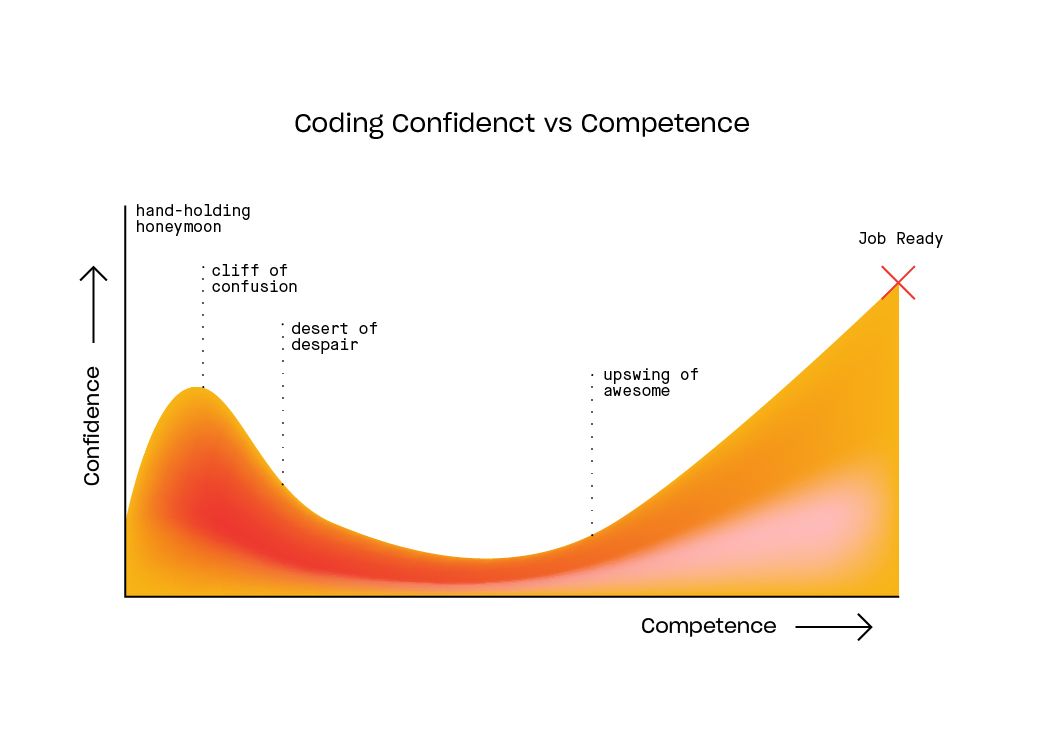
My goal is that during this course, you will reach the beginning of the upswing of awesome, at least when it comes to being able to use R to perform data analyses. But to get there, you’ll have to go over the cliff of confusion and through the desert of despair, and I’m confident that you’ll get there and won’t be stuck in the hand-holding honeymoon. In fact, at times I’m providing you less detailed instructions than I could to get you quickly to the stage where you have to figure out bits yourself. I guess one could say that instead of hand-holding, I let you stumble and fall some, and then will help you to get back up 😃. It might feel a bit more frustrating at least initially, but it’s a much better way to learn.
It goes without saying that learning to code (or learning anything else) is not a linear process. Even after many years of coding and using R, I regularly encounter the cliff of confusion and the desert of despair if I’m trying to do something new that I haven’t done before and invariably get stuck.
Learning the basics of R
Here is a quick crash course on R syntax to get you started.
Everything is an object. You create objects with <- (assignment) and reuse them later.
x <- 5 # assign 5 to object x
scores <- c(72, 88, 91)   # a numeric vector
R is vectorized. Most operations work on whole vectors, not just single numbers.
scores * 2         # multiply every element
mean(scores)       # built-in functions work on vectors
Data frames are tables. They hold columns of different types. Use $ to access a column.
df <- data.frame(name = c("Ana", "Bo", "Cal"), score = scores)
df$score + 10
Functions take inputs (arguments) and return outputs. You can nest them.
round(mean(df$score), digits = 1)Getting help
Maybe the most important skill for learning any programming language is figuring out how to find and get help with any problem.
In the past, we recommended starting with Google, StackOverflow, and the Internet to find relevant help. At this point, most of the time, you will likely get the best initial help from some AI tool. We recommend starting there, and if that doesn’t solve your problem, then move on to other sources.
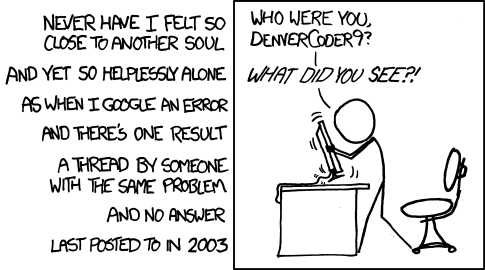
In those rare cases when AI doesn’t help and you cannot find the right information online either to solve your coding problem, feel free to ask for help. Sometimes, people complain that replies to questions they ask online are unfriendly or harsh. While this is at times true, consider that all the people providing answers are volunteers. They’re doing it because they want to help others, they don’t get paid for it. It is therefore important that the person asking the question does not waste people’s time by asking poorly formulated questions or questions that have been previously answered. In general, those kinds of questions get rude replies. If you have done your homework (i.e., searched online first to see if the answer is already available) and can precisely formulate the question/problem, ideally with a reproducible example, the chance that you get an unfriendly reply is very low.
I have found that a good way of posing a question is to write something like this: “I need help with SPECIFIC PROBLEM, I have searched around and found LINKS/DESCRIPTION OF SIMILAR ISSUES but that doesn’t quite solve my problem yet.” If you have a coding problem, add “Here is some code illustrating what I want to achieve and where the problem is.” and then add a minimal reproducible example.
The more you show you’ve done your homework and are truly stuck (instead of just being lazy and wanting others to do the work for you), and the easier you make it for others to understand what your problem is, the more likely you will get good answers.
With any coding problem you encounter there are three things you can do to make it easier to solve.
Make the error smaller. Break it down by steps and work through them one at a time. Commenting out code lines sequentially can be very helpful to identify where the error or issue is coming from. Reduce to a minimal example (i.e., instead of working with a large data set and thousands of lines use a small data subset and just the code you need so you can more easily see what’s happening or not).
Ask AI. This has the caveat that if you don’t write a good prompt it can lead you astray and make things worse especially if you don’t have a good understanding of what you are trying to do.
Someone has had the same problem before and written about it on the internet so search for the solution there. These searches are most fruitful when you use specific search terms with accepted jargon. Search like you’d write a function call, not a sentence, and it should generally follow this pattern function name + argument names + error keyword. (i.e., “R reshape data error” is a bad search while “R tidyr pivot_longer names_to values_to error duplicate names” is a good search)
Some further comments
R has a bunch of quirks. You’ll likely encounter a number of them. Here are a few common ones.
A common confusion is that there are two ways of assigning something to an object. One can write x <- 2 or x = 2 and often (but not always) you can use either. People argue about which way to do it. You’ll see both versions used frequently. If you are completely new to programming, we recommend the first version, i.e. x <- 2. The problem is that most other programming languages do it the second way, so if you learned to code in another language first, it is more natural to write x = 2. It is your choice. Just be aware that both notations exist. And to add to the confusion: In R, you can also write this in the opposite direction, i.e. 2 -> x. This is unusual coding style and best avoided. Just know that it exists too.
A more recent confusion - since the concept was introduced to R more recently - is the pipe. You can write x %>% dplyr() or you can write x |> dplyr(). In both versions, the object x is piped into the dplyr function. You see this style of writing a lot in the tidyverse and tidymodels set of packages, which we’ll discuss shortly. Both versions usually do the same thing. The first version comes from the magrittr package, which is part of the tidyverse. The second version is part of base R. Fortunately, most of the time it doesn’t matter. However, occasionally one will not work (or produce something unexpected). Just be aware of this and adjust as needed.
As you continue on your coding journey, keep in mind: The great thing about programming is that you (usually) can’t really “break” things too much. In the worst case you get an error message. So experiment and try out anything you like!
Summary
We discussed some basics of writing R code. To reiterate, this course is not a learn-to-code course. For resources that can help you learn R coding, see the Further Resources unit.
Further Resources
- The Posit (formerly RStudio) Community Forum is also a great place to ask for help.
Test yourself
Why is R’s vectorization useful when doing basic calculations?
Vectorization allows operations to be applied to full vectors at once (e.g., scores * 2), so you avoid writing explicit loops for basic calculations.
- False
- True
- False
- False
What is the main advantage of putting your code in a saved .R script instead of only using the console?
Saving code in a script provides a reproducible record you can rerun (e.g., with source()), instead of relying on ad-hoc console history.
- False
- True
- False
- False
What does the base pipe |> do in R?
The base pipe |> takes the value on the left and feeds it as the first argument to the function on the right, helping you write readable sequences of steps.
- False
- False
- True
- False
Practice
- Write a short script that creates a vector, computes its mean, and prints the result; save it as
.Rand run the whole file. - Add comments (
#) to that script explaining what each line does, then rerun to confirm nothing changes. - Use both
scores * 2andmean(scores)on a numeric vector to see vectorization in action; change the values and rerun. - Rewrite a small operation twice: once without a pipe and once with
|>, and compare which you find clearer.